I’ve seen requests on how allow Tridion content authors the ability to:
- control styling
- change the selectable options
- insert custom XML tags, or
- embed component presentations.
Consider using author-friendly, business-focused CSS classes along with your rich text format area GUI extension to accomplish this.
Control Styling or HTML Elements
Website and content professionals know about the risks with author-controlled manual look-and-feel styling. Inline styling might work for small sets of content on a single site, but doesn’t scale well, is brittle to change, and allows content that doesn’t apply to company branding.
Rather than giving inline styling control, you could offer CSS classes to separate content from layout, but you miss the point if you use design-related class names like “red.”
Good CSS class names to offer Tridion content authors:
- priority (high, medium, low, urgent, etc)
- department or product-related (marketing, mortgage, finance, featured)
- functional terms that have semantic meaning (note, callout, quote, video)
Not-as-good for the rich format (RTF) area editor:
- position (left, right, top, bottom-may be okay, but consider internationalization or what “left” might mean in a different context such as mobile)
- color, font, or presentation-related (red, blue, Arial, large)
- terms not clear or relevent to authors (col-20, clear, doc)
We can debate on appropriate names, but it’s better to err on the side of business terms and functionality rather than presentation.
Custom XML
I understand the appeal of allowing custom XML nodes in RTF. But it’s better to avoid these unless you’re willing to change the config and make an author-friendly extension to add, modify, and remove these tags. Though content editors may need control over source, ideally they should be able to do much of their work in the rich text format editor.
I don’t use “Best Practice” lightly, but maintaining valid markup, separating content from presentation (code), and reducing IT risk by not adding proprietary tags to rich text are all CMS Best Practices.
Custom tags, especially to a specific framework (3rd-party integration, .NET controls, Java tags, etc), add unnecessary risk to your CMS implementation. You’re asking for trouble if/when the CMS changes, the framework changes, or that hot social media API changes.
Embedded Component Presentations
Tridionauts regularly use component link references to associate content. Occasionally we have requirements to choose content and presentation within an RTF. Though I’d rather not have typical authors need to make these choices, occasionally you do need to place such things in an RTF area. For example:
- In-context placement for existing content (as in a call out, quote, definition, or certain media)
- Content authors that act as designers for select pages (use sparingly)
- Some other script-driven functionality when you don’t want authors to actually enter JavaScript into the RTF
Though you won’t be able to see the injected content in the RTF (without some creative extension work), you could easily mark such content injection with appropriate styling such as a border, background color, image, etc.
Worthy Formats
Frank van Puffelen suggested the “data-uri” HTML 5 attribute would make an ideal future-proof way to store such merge field references.
  <span class="keyword"
        data-uri="tcm:0-1-2">My keyword label</span>
Unfortunately, the default XSLT rich text filter + any content manager validation removes this element (at least in my SDL Tridion 2011 SP1-1 VM). If you can configure this the CMS to allow this, I’d suggest it as a good option and a great blog post topic.
Dominic Cronin has used the script tag to denote such merge fields. This lets you include both a value and a attribute/parameter value for use in your templating code. It also hints there’s more to this content than just content.
<script type="{something indicating json}">{foo: bar}</script>
He’s also pointed out that we’re not exactly dealing with XHTML in the RTF area, but rather “XML in the XHTML namespace.”
Chris Summers, Outbound Email itself, and plenty of Tridionauts I’m sure, use plain text with a delimeter. It’s a bad idea to use a single characters such as “[" and "]” since they could be part of the content.
- [[merge field]]
- [*merge field*]
- {{merge field}}
Choose a format that fits your development needs. For example, you might find it easier to parse text delimiters or XML attributes. Also avoid delimiters that your authors may need (unless you offer a way to escape such characters)
Sample Code
To add some visual flair, backup then update the FormatAreaStyles.css file in %TRIDION_HOME%/web/WebUI/Editors/CME/Configuration/.
And add a class such as:
.note {
	background-color:#FFFF66;
	padding:3px 5px;
}
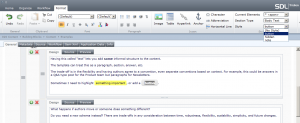
Authors can then apply this using the style drop down. If you want to get fancy (creatively lazy), check out CSSButtonGenerator.com to create a button look.
What’s next? Convert this agnostic, business-friendly format, to code or markup your presentation server can use. For the best performance, do this with Tridion templating. But if you need any (render-side) post-processing with non-Tridion data, consider some type of coding “hook” (tag, control, script variable) as the preferred approach. Use brute-force text replacement as a last resort.
Thanks to Dominic Cronin for the debate the revelation on worthy CSS class names for the RTF editor (he’s quite convincing on TridionWorld, Frank Van Puffelen on the HTML 5 format, and Chris Summers (et al) on the merge field variation. Follow and contribute to the StackOverflow Q&A on this topic. +1 specifically to Kah Tang’s answer-he offers yet another approach on converting these such classes delivery-side (actually client-side).
 I am sure we have all had it - that feeling of excitement of a crisp blank piece of paper and a set of freshly sharpened coloured pencils. You are about to start implementing Tridion templates for a greenfield website implementation. No legacy VBScript scribbles already on your canvas to worry about, your favourite .NET TBBs and Custom Functions at hand to boost productivity. You will be knocking out Component and Page Templates by the hour and feel the buzz of seeing that sexy new site start to form on staging before the end of the day! Then you check the source of the html files in the zip provided by the design agency and your heart starts to sink…
 The word complex in English means the exact same thing as it does in Dutch, although the Dutch dictionary simply puts it as: “compound, complicated” where in the English dictionary I at least find “composed of many interconnected parts” as a first description and the words complicated and hard to understand are following much later.